Vertical2

Wartune

Action begins with the first click! Featuring three unique classes, single and multi-player dungeons, PvP arenas, competitive battlegrounds, thousand-player boss battles, a guild system is reliable, and ... agriculture, Wartune incorporate some of your favorite features multiple game genres.

Ayodance Online

Let's dance with your friends that you are an expert dance show

Point Blank

Camon playing time war strategy together with your friends to defeat our enemies

RF Online

Raise your level in the game will be more exciting

Counter Strike

Who is not familiar with this one game. waooo ... surely you'd be curious form time with your friends to defeat the time-time adversary

Seal Online

Each player in the game will be displayed in the form of cute and funny 3D characters, which can provide a sense of comfort for everyone, making it easier for gamers to become acquainted. SEAL has interesting features such as character players can fish, dating, maintaining pet, chat via messenger (chat) and hunting (hunting) together.

Gundbound

Gundbound an online game genre action first entry into Indonesia. Released around 2004, Gunbound very fun play for pleasure. Unlike RPG online games, game BolehGame output is not 'demanding' gamers must stay in front of the computer for hours on end. The system itself can play in groups or individually, where the character played will be driving a 'vehicle' that can shoot ammunition to the opponent.

Showing posts with label Cara Patch Manual Game Online. Show all posts

Thursday, August 30, 2012

Cara Update "Patch" Manual Game Seal Online


First of all you must have a manual patch it, now how do I get?
We must first know which version of the current seal, and to find out type in the link below in your Mozilla. Open the file using notepad.
http://patch.sealonline.com/sealpatch/plus/version.ini

To find out what version is needed, note the contents of the file "version.ini" is.

Suppose now you are 10 versions Seal, and Seal had to patch up to version 11, and you want to do a manual patch for the patch autoupdatenya often not the way, you have to remember the text that I put a red, for example "root_0.11.zip" and "interface_0.11.zip".
You just add the file name in a link like the example below with your Mozilla.

http://patch.sealonline.com/sealpatch/plus/root_0.11.zip
http://patch.sealonline.com/sealpatch/plus/interface_0.11.zip
Download the two files to do the manual patch Seal Plus.
Open the folder you are storing Seal Online Plus, find the folder "Update" and delete all files in the folder, uittt, folder "Update" you know its not in the clear ...
Do not close the folder, let it be so, ntar in pake again.
Run AutoUpdate.exe please her.
To copy a file that you downloaded earlier there are several techniques, this time I will teach how to be funny reply.
Now his technique like this, when you run AutoUpdate.exe, direct you paste the files you have before you donwload, may speed ga, and ga may also slow, so laucher appear, you instantly paste. The process was straight finish patch ...
Hopefully this article sapat help a friend "who wants to play Seal Online Plus.
Love SEAL ^ ^

Cara Update "Patch" Manual RF Online


Hello Patriot RF,

Patriot RF current is able to manually download the latest update patch for RF Online: Golden Mystery
Patriot RF can follow the steps below:

1. Download file Golden_Patch.zip
2. Copy the file into the folder Golden_Patch.zip RF Online.
3. Extract the files contained in folders Golden_Patch.zip into RF Online.

Note
Please Patriot RF extract process is done at RF Online update: Golden Mystery implemented, which is on January 20, 2010. If the Patriot RF extract proceed before the date of the update, the Patriot can not play RF Online RF Legend of Elven Today.


Here is a Tutorial Manual Patch Golden Mystery:
1. Click the MANUAL PATCH DOWNLOAD GOLDEN MYSTERY
2. If no option like this, select Save File and click OK.


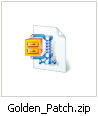
3. After that it will appear on your desktop icon as shown below
(depending on the location where you save the download to you).


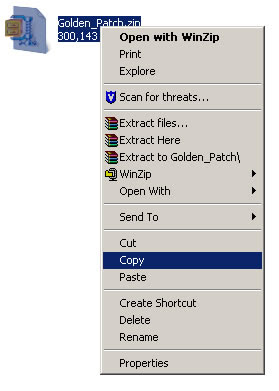
4. After that you right click on the icon and select the Copy option as shown below.

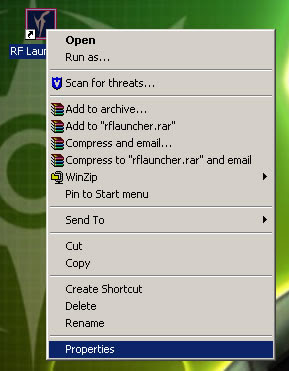
5. Then paste on your RF Online folder. To go into Folder RF, can you do with the way: right click on the icon that RF Online is your desktop and select Properties option.


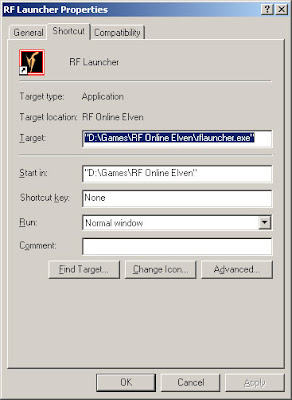
6. And after the image appears as below, click on Find Target option.

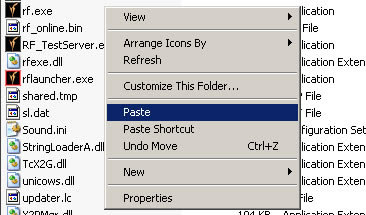
7. Then you will enter your RF folder, then right-click an empty area (do not click on any icons) and choose the option Paste or press CTRL and V keys on your keyboard.

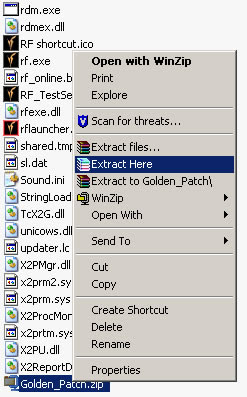
8. After that you right click on the icon and select Extract Here option as shown below.


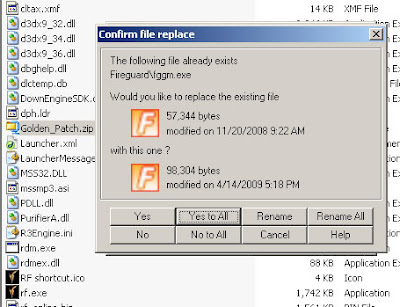
9. After confirmation notice will appear to replace the old files with new files, then choose Yes to All, as pictured below.


10. Then click 2x rflauncher.exe that is in your RF folder, after the message OK, and then press ENTER.

Related Posts Plugin for WordPress, Blogger...